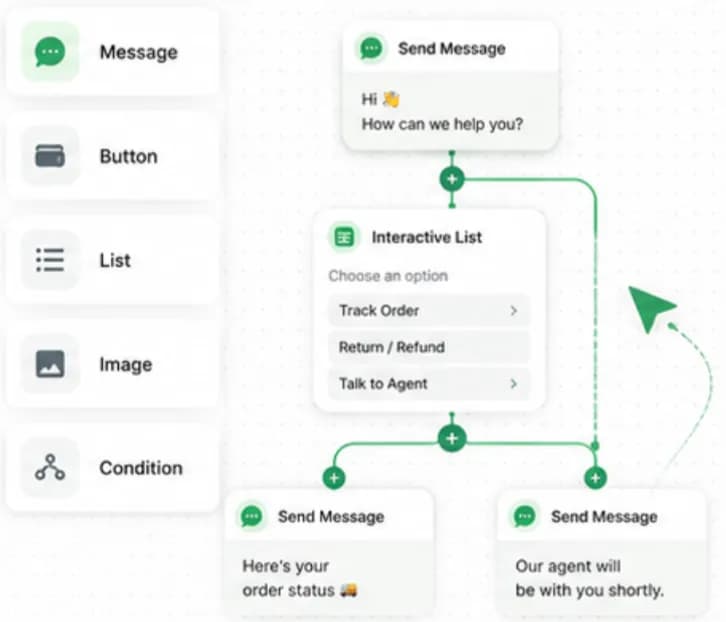
Key takeaways
- WhatsApp chatbots run on the WhatsApp Business API and reply inside the 24-hour customer service window opened by the customer.
- Service replies to customer-initiated chats are free under Meta's pricing.
- The best support bots combine buttons and lists for common tasks with a clear path to a human agent.
- Chatbox AI's no-code builder lets support teams build flows by drag-and-drop, with human handoff to the Team Inbox preserving chat history.
- Track containment, handoff rate, resolution time and customer satisfaction to judge a bot, not just message volume.
Support teams answer the same questions every day: Where is my order? How do I return this? What are your timings? Can I reschedule? On WhatsApp, a well-designed chatbot can answer these in seconds, day or night, and pass everything else to your agents with context.
This guide covers how to plan, build and run a WhatsApp support chatbot that customers actually like using.
What is a WhatsApp customer support chatbot?
It is an automated assistant running on the WhatsApp Business API. When a customer messages your business number, the bot responds with text, buttons, lists, media or data fetched from your systems. When it reaches its limits, it hands the chat to a human.
Because the customer starts the conversation, the bot works inside the 24-hour customer service window: it can send free-form and interactive messages, and those service replies are free under Meta's pricing.
Why use a chatbot for WhatsApp support?
- 24/7 availability: customers get answers at midnight and on Sundays.
- Instant first response: no waiting in a queue for simple questions.
- Lower support load: agents focus on complex, high-value cases.
- Consistent answers: the same policy, every time.
- Structured data: order IDs, issue types and contact details are captured before an agent joins.
Pair the bot with proactive updates and many questions never get asked in the first place:
"Automated delivery notifications reduced our customer inquiries by over 60%." - Rahul Desai, CEO, LogisticsPro
Which support tasks should a chatbot handle?
| Task | Bot handles | Human handles |
|---|---|---|
| Order status and tracking | Look up order, share tracking link | Delayed or lost shipments |
| Returns and exchanges | Explain policy, start return request | Disputes, damaged goods |
| FAQs (timings, pricing, policies) | Fully | Rarely |
| Appointment booking | Show slots via lists, confirm | Special requests |
| Payment issues | Share payment link, confirm status | Failed refunds, disputes |
| Lead qualification | Ask qualifying questions | Closing the sale |
| Complaints | Capture details, acknowledge | Resolution and recovery |
Start with the top five question types by volume. You will usually find they make up a large share of incoming chats.
How do you design a good support flow?
Start with a clear welcome menu
Greet the customer, say what the bot can do and offer three to five buttons or a list:
- Track my order
- Returns and exchanges
- Talk to an agent
- Other questions
Interactive buttons and lists are faster than typing and reduce misunderstandings.
Understand free text too
Customers do not always tap buttons. Chatbox AI's natural language AI detects intent rather than exact keywords, handles misspellings and phrasing variations, and can extract details such as order numbers or dates.
Keep each step short
One question per message. Confirm what the customer said before moving on ("Got it, order #12345. Checking now…").
Connect to real data
A bot that says "please check your email" is not helping. Use the Shopify integration or webhooks and APIs to fetch live order status, booking slots or account details.
Always offer a way out
Every flow should include "Talk to an agent". Forcing customers through loops is the fastest way to frustrate them.
How should human handoff work?
Handoff is where many bots fail. Do it well:
- Trigger it clearly: when the customer asks for a human, when the bot fails to understand twice, or for sensitive topics like refunds and complaints.
- Route to the right team: sales, support or billing, using chat routing and assignment rules.
- Pass the context: Chatbox AI transfers the conversation to the Team Inbox with the entire chat history, so agents can see everything the bot collected.
- Set expectations: tell the customer when an agent will reply, especially outside business hours.
- Let agents hand back: once resolved, the bot can send a satisfaction survey.
"The AI routing is flawless. It automatically categorizes and assigns our support tickets." - Priya Sharma, Head of Support, FinServe
What about after-hours support?
Use automation for out-of-office replies: tell customers when you will be back and offer a self-serve menu, track an order, read FAQs, while they wait. When agents come online, they pick up the queued chats. Remember that the 24-hour window keeps running; reply before it closes or use a utility template to follow up.
Which metrics show whether your bot is working?
| Metric | What it tells you |
|---|---|
| Containment rate | Share of chats fully resolved by the bot |
| Handoff rate | How often the bot passes to humans (and why) |
| First response time | Should be near-instant for bot-handled chats |
| Resolution time | Time from first message to resolution |
| Drop-off points | Steps where customers abandon the flow |
| CSAT | Customer satisfaction after the conversation |
| Agent workload | Chats per agent before and after launch |
Chatbox AI analytics and agent reports show response times, volumes and agent performance.
What mistakes should you avoid?
- Trying to automate everything on day one. Start with the top few intents.
- No human escape route. Always offer "Talk to an agent".
- Long walls of text. WhatsApp is a chat, not a help centre article.
- Stale answers. Review flows monthly when policies or prices change.
- Ignoring drop-off data. Fix the steps where customers leave.
- Using the bot to push promotions during support conversations. It feels tone-deaf and increases blocks.
How do you build a support bot with Chatbox AI?
- List your top intents from the last month of support chats.
- Write the answers in plain, short language, and in the languages your customers use. Chatbox AI supports multi-language bots.
- Build the flows in the visual no-code chatbot builder: welcome menu, one flow per intent, and a handoff step.
- Connect data via Shopify, webhook APIs or your CRM.
- Set routing rules so handoffs reach the right team in the team inbox.
- Add quick replies for agents' most common answers (quick replies).
- Test with your team, then launch to all customers.
- Review weekly: containment, drop-offs and CSAT, and improve.
The Starter plan includes 3 chatbot flows; Growth includes unlimited flows, the team inbox with assignment rules and the analytics dashboard. See the pricing page.
Where do support chatbots help most?
- E-commerce: order tracking, returns, COD confirmations
- Logistics: delivery status, rescheduling
- Healthcare: appointment booking and reminders
- Fintech: payment reminders and account queries
- Travel: booking changes and itineraries
For the full support picture, visit WhatsApp for customer support.
Give every customer an instant answer
A WhatsApp support chatbot does not replace your team, it gives them time back and gives customers faster answers. Start small, connect real data, make handoff seamless and improve every week.
Start your 7-day free trial of Chatbox AI and build your first support flow today: no code, no credit card.
Frequently asked questions
No. Chatbox AI's visual flow builder is designed for support managers and marketers. You drag in messages, buttons, lists and conditions. Developers can add API and webhook steps for things like live order lookups.
Do I need coding skills to build a WhatsApp chatbot? No. Chatbox AI's visual flow builder is designed for support managers and marketers. You drag in messages, buttons, lists and conditions. Developers can add API and webhook steps for things like live order lookups.
Can a WhatsApp chatbot hand over to a human? Yes. When a customer asks for a person or the bot cannot help, the chat moves to the Team Inbox with the full history, so the agent does not have to ask the same questions again.
Is a WhatsApp chatbot free to run? Replies to customer-initiated chats are free from Meta's side. You pay your platform plan: Chatbox AI's Starter includes 3 chatbot flows and Growth includes unlimited flows. Templates sent after the 24-hour window are charged.
What languages can the chatbot support? Chatbox AI's chatbot can be configured for over 50 languages with automated fallback options, which helps brands serving customers in Hindi and regional Indian languages.
Can the chatbot check order status automatically? Yes. With the Shopify integration or a webhook to your order system, the bot can ask for an order ID or phone number and reply with live status and tracking links.
