Registrations that turn into real attendance
Promote events to opted-in audiences, confirm registrations with tickets and joining links, send timed reminders and follow up with recordings and offers, all on WhatsApp.
- No credit card needed
- Setup in 5 mins
- Official WhatsApp API
Trusted by 210,000+ businesses across 68+ countries









Why businesses choose Chatbox AI for
Events & Webinars
Higher show-up rates
Reminders with one-tap joining links land on the app attendees check most, not buried in email promotions tabs.
Tickets always at hand
E-tickets, QR codes and venue details sit in the chat, ready at the entry gate.
Better post-event conversion
Follow up with recordings and offers while interest is still high, segmented by who attended.
Powerful capabilities
to scale on WhatsApp
Everything you need to automate conversations and drive conversions.
Fill seats faster
Registration campaigns
Broadcast event announcements to opted-in segments and let people register in the chat with a WhatsApp form or chatbot. Click-to-WhatsApp ads bring in new registrants directly.
- Event announcements to targeted segments
- In-chat registration with WhatsApp forms
- Click-to-WhatsApp ads for new audiences
Timed to the minute
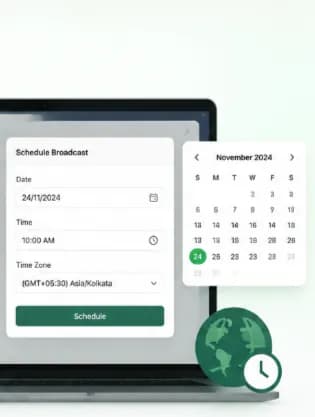
Scheduled reminders with joining links
Schedule confirmation, day-before, hour-before and starting-now reminders in the attendee's time zone. Each one carries the joining link or venue map, so there's no hunting through inboxes.
- Multi-step reminder sequences
- Time-zone aware scheduling
- Joining links, tickets and venue maps
Smooth event days
Tickets and on-ground updates
Send e-tickets and QR codes as soon as registration or payment completes. On the day, broadcast agenda changes, hall numbers and parking information to everyone at once.
- E-tickets and QR codes after payment
- Payment links for paid events
- Live agenda and venue updates
Know what worked
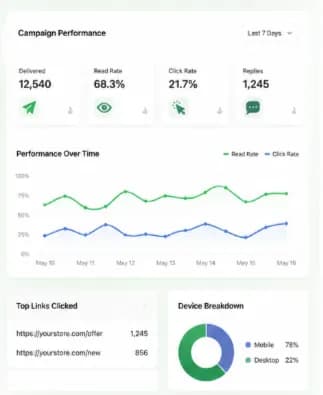
Attendance and campaign analytics
Track delivery, read and click rates for every invite and reminder, and compare registrations to attendance. Follow up with attendees and no-shows using different messages.
- Delivery, read and click reports
- Segments for attendees vs. no-shows
- Recording and replay follow-ups
How teams use
Events & Webinars
Event promotion
Announcements to opted-in audiences and past attendees.
Registration confirmation
Instant confirmations with calendar details.
Webinar reminders
Day-before, hour-before and live-now alerts.
E-tickets and passes
QR tickets delivered after payment.
Recording follow-ups
Replays for no-shows and resources for attendees.
Feedback surveys
Quick ratings and NPS right after the event.
Questions about
Events & Webinars
Got questions about Events & Webinars? We've got answers.
Collect WhatsApp opt-in during registration, then use Chatbox AI to schedule a reminder sequence, for example one day, one hour and five minutes before start, each with the joining link. Registrations from your form or landing page can trigger the sequence via webhook.
How do I send webinar reminders on WhatsApp? Collect WhatsApp opt-in during registration, then use Chatbox AI to schedule a reminder sequence, for example one day, one hour and five minutes before start, each with the joining link. Registrations from your form or landing page can trigger the sequence via webhook.
Can people register for an event inside WhatsApp? Yes. Use a WhatsApp form or chatbot to collect name, email and preferences inside the chat. For paid events, share a payment link, and send the e-ticket automatically once the payment is confirmed.
Can I send different follow-ups to attendees and no-shows? Yes. Tag contacts based on attendance data from your webinar or ticketing tool, then send attendees resources and offers while no-shows get the recording and an invite to the next session.
How many people can I message about an event? Your daily limit follows Meta's messaging tiers, 1K, 10K, 100K or unlimited unique customers in 24 hours, which grow as your number keeps a good quality rating. Only message people who have opted in to hear from you.
Does it work for offline events as well as webinars? Yes. Conferences, workshops, concerts and meetups use the same flows: registration, tickets with QR codes, venue maps, day-of updates and post-event surveys. You can broadcast last-minute changes to all attendees at once.
Keep exploring

Your next 10,000 customers are already on WhatsApp.
Broadcast, automate, sell and support on the official WhatsApp Cloud API. Join 210,000+ businesses getting up to 98% open rates, and go live in under 2 minutes.
- 7-day free trial
- No credit card
- Cancel anytime