Build on WhatsApp with clean APIs and webhooks
Comprehensive documentation and tools to connect Chatbox AI to your store, CRM, ERP or backend: send template and session messages, sync contacts and receive real-time events.
- No credit card needed
- Setup in 5 mins
- Official WhatsApp API

Trusted by 210,000+ businesses across 68+ countries










Why businesses choose Chatbox AI for
Developer APIs
Predictable REST design
Resource-based endpoints, JSON everywhere and clear error responses.
Real-time webhooks
Get pushed events for new messages, status changes and conversation updates.
Secure by default
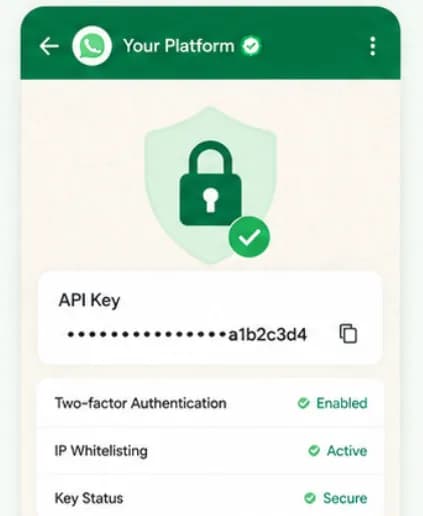
Authenticated requests over TLS, with WhatsApp access tokens encrypted at rest.
Powerful capabilities
to scale on WhatsApp
Everything you need to automate conversations and drive conversions.
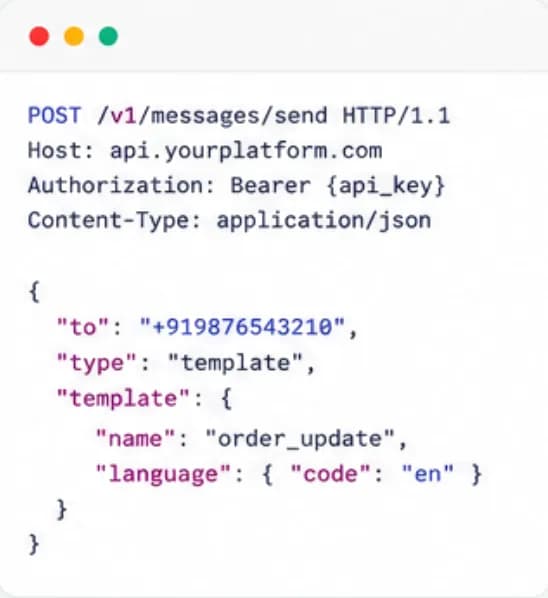
Every endpoint, documented.
API reference
Detailed endpoints, authentication methods, parameters and response structures for messages, templates, contacts and conversations, with example requests you can paste into your terminal.
- Send template and session messages
- Create and update contacts and tags
- Look up template approval status
- Consistent JSON errors
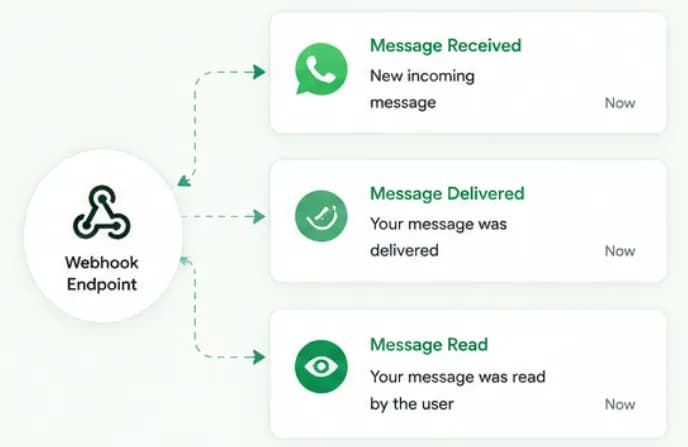
React to events as they happen.
Webhooks
Subscribe to incoming messages, delivery and read receipts and failures, then route them into your CRM, helpdesk or order system without polling.
- Inbound message events
- Sent, delivered, read and failed statuses
- JSON payloads for any HTTPS endpoint
- Works with Integrately and no-code tools
Go from docs to working code faster.
SDKs, samples and testing
Official wrappers and quickstart guides for Node.js, Python, Ruby and PHP, plus a pre-configured Postman workspace, let you test the API and webhooks before writing production code.
- Quickstart guides
- Postman collection for quick testing
- Copy-paste request examples
- Test with your own number first
Set up Developer APIs
in minutes
- 1
Create an account
Start the 7-day free trial and connect your WhatsApp Business number.
- 2
Generate API credentials
Create an API key from your dashboard settings and store it securely on your server.
- 3
Send your first message
Call the send-message endpoint with an approved template and a test recipient.
- 4
Register a webhook
Add your HTTPS endpoint to receive inbound messages and delivery statuses in real time.
How teams use
Developer APIs
Order notifications
Trigger order, shipping and COD confirmation messages from your store or OMS.
OTP delivery
Send authentication templates for login and payment verification.
CRM sync
Push leads and conversations into your CRM, and pull segments back for campaigns.
Custom automations
Build workflows the no-code builder doesn't cover yet.
Questions about
Developer APIs
Got questions about Developer APIs? We've got answers.
Webhook integrations are available on Chatbox AI's paid plans, and the Scale plan adds custom integrations and full API access with a dedicated account manager. Compare plans on the pricing page or talk to sales about your integration needs.
Which plans include API access? Webhook integrations are available on Chatbox AI's paid plans, and the Scale plan adds custom integrations and full API access with a dedicated account manager. Compare plans on the pricing page or talk to sales about your integration needs.
Is the Chatbox AI API built on the official WhatsApp Business API? Yes. Chatbox AI is built on Meta's official WhatsApp Business Cloud API. The Chatbox AI API adds contacts, templates, conversations and automations on top, so you don't have to manage Meta tokens, retries and message storage yourself.
Can I receive incoming WhatsApp messages via webhook? Yes. Register an HTTPS endpoint and Chatbox AI will send events for inbound messages and message status changes, sent, delivered, read and failed, so your systems can react in real time.
How are API requests secured? Requests are authenticated and sent over TLS. WhatsApp Business access tokens are encrypted at rest, and you can revoke access at any time from your Meta Business Manager.
Can I integrate without writing code? Yes. Use native integrations such as Shopify, Razorpay, WebEngage and LeadSquared, or connect hundreds of apps through Integrately, no custom code needed.
Are there sending limits? Yes. Meta limits how many unique customers each WhatsApp number can start conversations with in a rolling 24 hours, 1K, 10K, 100K or unlimited tiers, based on your quality rating and volume. Design integrations to queue sends and handle failed statuses gracefully.
Keep exploring

Your next 10,000 customers are already on WhatsApp.
Broadcast, automate, sell and support on the official WhatsApp Cloud API. Join 210,000+ businesses getting up to 98% open rates, and go live in under 2 minutes.
- 7-day free trial
- No credit card
- Cancel anytime