Full developer access to WhatsApp.
Integrate Chatbox AI with your existing stack. Send messages and manage contacts with a REST API, and receive real-time webhooks for incoming messages and delivery updates.
- No credit card needed
- Setup in 5 mins
- Official WhatsApp API

Trusted by 210,000+ businesses across 68+ countries










Why businesses choose Chatbox AI for
API & Webhooks
Developer-friendly
Clean REST endpoints and JSON payloads you can call from any language or no-code tool.
Real-time events
Webhooks push incoming messages and status changes to your backend within seconds.
Secure by design
Workspace API keys and HTTPS-only endpoints keep your data and customers protected.
Powerful capabilities
to scale on WhatsApp
Everything you need to automate conversations and drive conversions.
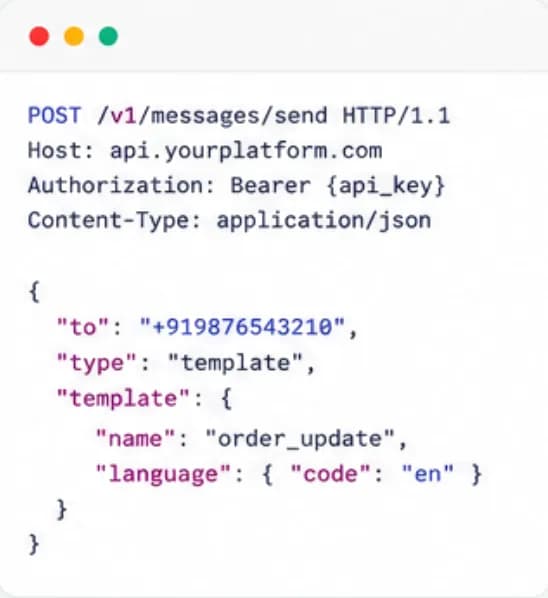
Send and manage programmatically
RESTful API
Send template and session messages, upload media, create and update contacts, add tags and trigger flows from your own application, CRM or backend jobs.
- Send template and free-form messages
- Contacts, tags and attributes endpoints
- Media upload and message status lookup
Events pushed to you
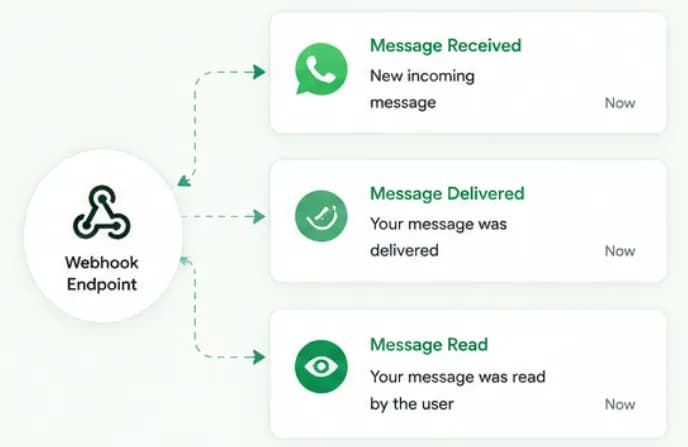
Real-time webhooks
Register an endpoint and receive events the moment they happen, a new message received, a message delivered or read, a button tapped, so your systems stay in sync.
- Message received, delivered and read events
- Button and list reply events
- JSON payloads to any HTTPS endpoint
Keys you control
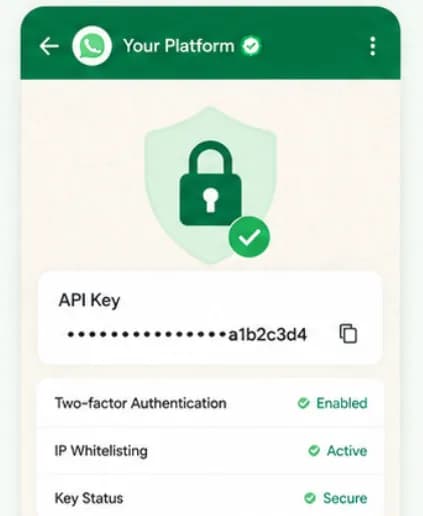
Secure authentication
Create and revoke API keys from the dashboard, keep them scoped to your workspace, and send every request over HTTPS so credentials never travel in the clear.
- Create and revoke keys
- HTTPS-only endpoints
- Keys scoped to your workspace
Set up API & Webhooks
in minutes
- 1
Connect your number
Link your WhatsApp Business API number to Chatbox AI in under 2 minutes.
- 2
Create an API key
Generate a key in the dashboard and store it securely on your server.
- 3
Register a webhook
Add your HTTPS endpoint to receive incoming messages and status updates.
- 4
Send your first message
Call the send-message endpoint with an approved template and a phone number.
How teams use
API & Webhooks
OTP delivery
Send authentication templates with one-time passwords from your backend.
Order and shipping updates
Trigger utility messages from your OMS or logistics partner.
CRM sync
Log every WhatsApp conversation against the lead or customer record.
Internal alerts
Forward high-priority replies to Slack or your ticketing tool.
Questions about
API & Webhooks
Got questions about API & Webhooks? We've got answers.
Yes. Chatbox AI is an official WhatsApp Business API platform with its own REST API and webhooks on top of Meta's Cloud API, so you can send messages and receive events without managing Meta's infrastructure yourself.
Does Chatbox AI provide a WhatsApp API? Yes. Chatbox AI is an official WhatsApp Business API platform with its own REST API and webhooks on top of Meta's Cloud API, so you can send messages and receive events without managing Meta's infrastructure yourself.
Which plans include API and webhook access? Webhook integrations are included in the Growth plan (₹2,999/month). Full API access and custom integrations are part of the Scale plan, which also adds an SLA and a dedicated account manager.
What events can I receive via webhooks? You can receive incoming messages, delivery and read status updates, button and list replies, and contact events, delivered as JSON to your HTTPS endpoint in real time.
Can I send WhatsApp OTPs through the API? Yes. Create an authentication template, get it approved by Meta, then call the send endpoint with the customer's number and code. In India, authentication messages are priced at about ₹0.12 each by Meta.
Where can I find the API documentation? Yes. Developer documentation with request examples is available in our developer resources, and you can test the full API during the 7-day free trial before going live.
Keep exploring

Your next 10,000 customers are already on WhatsApp.
Broadcast, automate, sell and support on the official WhatsApp Cloud API. Join 210,000+ businesses getting up to 98% open rates, and go live in under 2 minutes.
- 7-day free trial
- No credit card
- Cancel anytime