Key takeaways
- Click-to-WhatsApp ads run on Facebook and Instagram and open a WhatsApp chat with the business when tapped.
- Because the customer starts the chat, the business can reply with free-form messages inside the 24-hour customer service window.
- Replying within 24 hours to a Click-to-WhatsApp ad chat opens a 72-hour free entry point window, during which messages are not charged by Meta.
- A chatbot that greets and qualifies leads instantly prevents ad clicks from going cold.
- Track cost per conversation and cost per qualified lead or sale, not just clicks.
Most ads send people to a landing page and hope they fill in a form. Click-to-WhatsApp ads skip that step: one tap opens a chat with your business, with a pre-filled message ready to send. For many businesses, especially in India, where customers prefer to ask questions before buying, that conversation is the conversion.
"Our ROAS went up by 4x since we started running WhatsApp ads through Chatbox AI." - Arjun Mehta, Founder, Trendz
What are Click-to-WhatsApp ads?
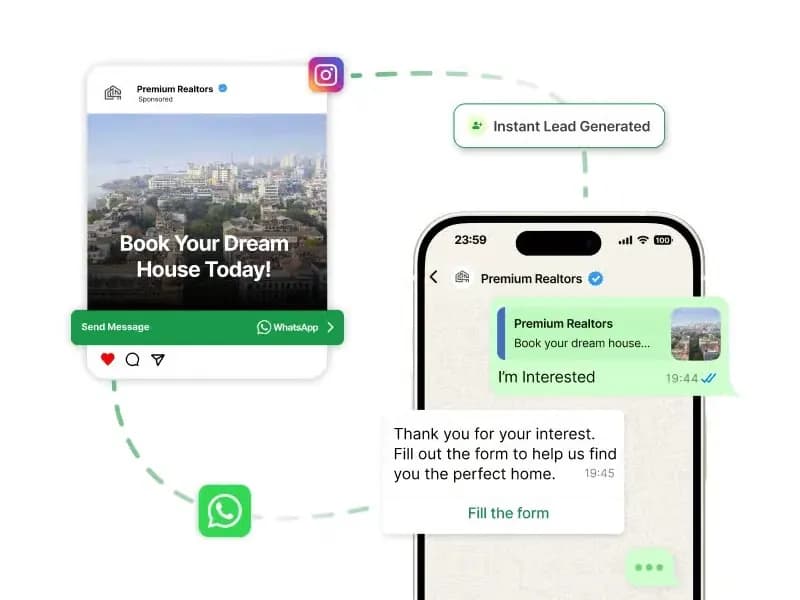
Click-to-WhatsApp (CTWA) ads are Facebook and Instagram ads with a "Send WhatsApp message" button. When someone taps it, WhatsApp opens a chat with your business number, often with a pre-filled greeting like "Hi, I'd like to know more about the summer collection."
They work with any ad format, image, video, carousel, and can appear in Feed, Stories and Reels.
Why do Click-to-WhatsApp ads convert well?
- No form friction. Customers do not need to type their details; their WhatsApp number comes with the chat.
- Customer starts the conversation. That opens a 24-hour customer service window for free-form replies.
- Free 72-hour window. If you reply within 24 hours, Meta opens a 72-hour free entry point window in which messages are not charged. See WhatsApp conversation pricing.
- Ongoing relationship. Once the customer opts in, you can follow up with templates days or weeks later.
- Instant qualification. A chatbot can ask the right questions before a salesperson steps in.
How does a Click-to-WhatsApp funnel work?
| Stage | What happens | Tool |
|---|---|---|
| Ad | Customer sees an offer on Instagram or Facebook | Meta Ads Manager |
| Click | Chat opens with a pre-filled message | |
| Greeting | Instant reply with buttons | No-code chatbot |
| Qualification | Bot asks budget, product, city, timeline | Chatbot flow |
| Handoff | Hot leads go to sales with full context | Team inbox |
| Conversion | Catalogue, payment link or booking in chat | Catalogue, Razorpay |
| Nurture | Opted-in leads receive follow-up templates | Automation |
How do you set up Click-to-WhatsApp ads?
1. Connect WhatsApp to your Meta assets
Link your WhatsApp Business number to your Facebook Page and ad account in Meta Business settings. If you use Chatbox AI, your number is already on the WhatsApp Business API.
2. Create the campaign in Ads Manager
Choose an objective that supports a messaging destination (Meta periodically renames objectives, look for options where WhatsApp can be set as the conversion location). Select WhatsApp as the destination and pick the connected number.
3. Target the right audience
Start with interest and location targeting relevant to your offer, plus lookalikes of existing customers. Exclude people who already converted.
4. Write the ad and the pre-filled message
The ad promises a specific benefit; the pre-filled message tells you which ad the lead came from ("Hi, I want the free counselling session"). Use a different pre-filled text per campaign to make tagging easier.
5. Build the welcome flow
This is the step most advertisers neglect, and where most money is lost. Before you spend a rupee, set up an instant chatbot reply for each campaign.
What should the welcome flow do?
A good welcome flow replies in seconds and moves the lead forward:
- Acknowledge the ad: "Thanks for your interest in our Summer Sale!"
- Offer choices with buttons: "See bestsellers", "Get my discount code", "Talk to an expert".
- Qualify with two or three questions: product interest, budget, city, timeline.
- Tag the contact with the campaign and answers using contact management.
- Ask for opt-in to receive future updates on WhatsApp.
- Route hot leads to the right agent; send others into a nurture sequence.
Chatbox AI's keyword triggers can start a specific flow based on the pre-filled message, so each campaign gets its own welcome.
How should you follow up with leads?
Not everyone buys in the first chat.
- Within the 72-hour free window: send reminders, product details, social proof and offers without Meta messaging charges.
- After the window: use approved marketing or utility templates for opted-in leads.
- Drip sequences: for example, Day 1 welcome, Day 3 tips or reviews, Day 7 special offer, built with automation.
- Sales CRM sync: push qualified leads to LeadSquared or other CRMs via webhooks.
"We doubled our enrollment rate simply by following up with leads on WhatsApp." - Siddharth Rao, CMO, EduTech India
What does a Click-to-WhatsApp flow look like in practice?
Take an education company advertising a free career counselling session on Instagram:
- Ad: a short Reel of a counsellor explaining how the session works, with the button "Send WhatsApp message".
- Pre-filled message: "Hi, I want a free counselling session."
- Instant reply: the chatbot thanks them and asks which course they are interested in, using a list message.
- Qualification: two more questions, current education level and preferred start date.
- Opt-in: "Can we send you course updates and reminders on WhatsApp?" with Yes/No buttons.
- Handoff: leads who want to start within three months go straight to a counsellor in the team inbox; others enter a nurture sequence.
- Booking: the counsellor shares available slots and confirms the session in the same chat, followed by a utility reminder template before the call.
The whole journey happens in one thread, and the counsellor sees every answer before saying hello.
How should you budget for Click-to-WhatsApp ads?
Start with a modest test budget per campaign and judge it on cost per qualified lead after a week or two, not on the first day's clicks. Scale the ad sets whose leads convert, and pause those that generate chats but no qualified leads. Remember that the ad spend is paid to Meta separately from WhatsApp messaging charges and your Chatbox AI plan.
Which metrics should you track?
| Metric | Why it matters |
|---|---|
| Cost per conversation started | Ad efficiency |
| First response time | Speed-to-lead; aim for instant via bot |
| Qualification rate | Share of chats that meet your criteria |
| Cost per qualified lead | Ad spend ÷ qualified leads |
| Conversion rate | Leads that buy, book or enrol |
| Return on ad spend | Revenue ÷ ad spend |
Tag every contact with its campaign so analytics can connect ad spend to WhatsApp outcomes. Click-to-WhatsApp ad support and revenue attribution are included in Chatbox AI's Growth and Scale plans, see the pricing page for details.
Which industries get the most from CTWA ads?
- Edtech: counselling sessions, course enquiries, demo classes
- Real estate: project brochures, site-visit bookings
- Travel: package enquiries and itinerary planning
- Automobile: test-drive bookings, finance enquiries
- E-commerce: product questions, sizing help, first-order offers
- Healthcare: appointment booking
What mistakes should you avoid?
- Slow replies. A lead who waits an hour has often moved on. Automate the first response.
- One generic flow for every ad. Match the welcome to the ad's promise.
- Asking too many questions. Two or three qualifiers are enough.
- No opt-in step. Without it, you cannot follow up with templates later.
- Measuring clicks only. Judge campaigns on qualified leads and revenue.
- No agent coverage. Hot leads need a human quickly during business hours.
Turn ad clicks into conversations that convert
Click-to-WhatsApp ads work best when the ad, the chatbot and the sales team act as one funnel. Build the welcome flow first, reply instantly, qualify smartly and follow up within the free window. Learn more about WhatsApp for lead generation and WhatsApp for sales.
Start your 7-day free trial of Chatbox AI and have your Click-to-WhatsApp welcome flow live before your next campaign.
New to the format? Start with our explainer: What are Click-to-WhatsApp ads?
Frequently asked questions
No, ads can point to a WhatsApp Business app number as well. But the API lets you reply instantly with a chatbot, route leads to multiple agents, tag contacts by campaign and measure results, which matters once ad spend grows.
Do I need the WhatsApp Business API to run Click-to-WhatsApp ads? No, ads can point to a WhatsApp Business app number as well. But the API lets you reply instantly with a chatbot, route leads to multiple agents, tag contacts by campaign and measure results, which matters once ad spend grows.
Are messages from Click-to-WhatsApp ads free? When a customer messages you from a Click-to-WhatsApp ad and you reply within 24 hours, Meta opens a 72-hour free entry point window in which messages, including templates, are not charged. You still pay Meta for the ad itself.
What objective should I choose in Ads Manager? Ads Manager offers objectives that support messaging destinations, such as engagement or sales with WhatsApp as the conversion location. The exact names change, so choose the objective that lets you set WhatsApp as the destination.
Can I retarget people who messaged me from an ad? If they opted in to receive messages, you can follow up on WhatsApp with approved templates. You can also build ad audiences from people who engaged with your messaging ads, within Meta's advertising rules.
Which businesses benefit most from Click-to-WhatsApp ads? Businesses where a conversation helps the sale: education, real estate, travel, automobiles, financial products, healthcare appointments and considered e-commerce purchases.
