Key takeaways
- A Click-to-WhatsApp ad is a Meta ad on Facebook or Instagram with a 'Send WhatsApp message' button.
- Because the customer messages first, the conversation starts inside the customer service window, with no template needed.
- Replying within 24 hours opens a 72-hour free entry point window during which Meta does not charge for messages.
- You pay Meta for the ad itself, just like any other Facebook or Instagram campaign.
- Ad referral details arrive with the first message, so leads can be attributed to the exact ad.
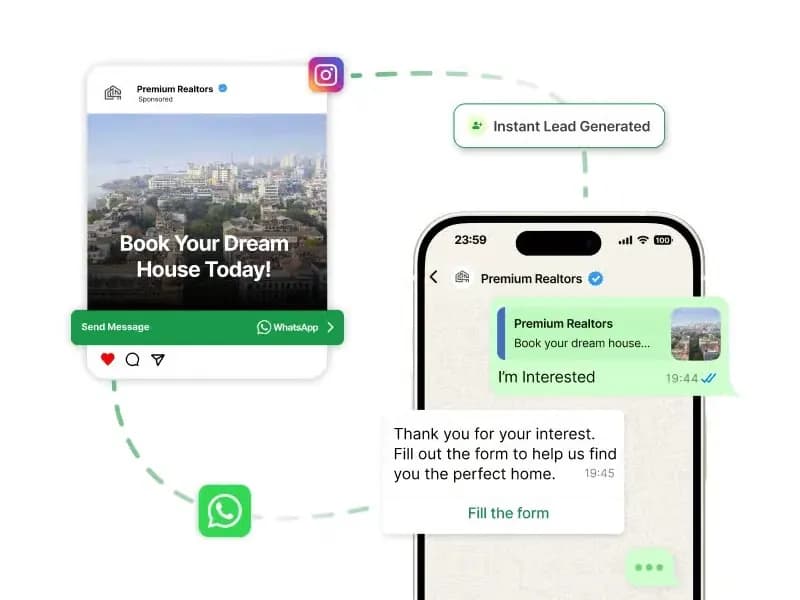
Most ads send people to a landing page and hope they fill a form. Click-to-WhatsApp ads skip the page. The customer taps the button, WhatsApp opens with a pre-filled message, and a real conversation starts with your business.
What is a Click-to-WhatsApp ad?
A Click-to-WhatsApp (CTWA) ad is an ad on Facebook or Instagram with a Send WhatsApp message button. It is created in Meta Ads Manager, usually with the Engagement or Leads objective and WhatsApp as the conversion location, and linked to your business's WhatsApp number.
When someone taps the button:
- WhatsApp opens a chat with your business.
- A greeting message you set is pre-filled for them to send, and optional quick questions can appear.
- Once they send it, the conversation is theirs, which means you are inside the 24-hour customer service window.
Why do businesses use Click-to-WhatsApp ads?
- Fewer steps. No landing page load, no form. Mobile users stay in apps they already use.
- Real conversations. Customers can ask about price, size, EMI or availability, and you can answer on the spot.
- You keep the contact. The lead's WhatsApp number becomes a contact you can re-engage later with consent.
- Lower messaging cost. Replies in the service window are free, and CTWA ads unlock the longer free entry point window.
What is the 72-hour free entry point window?
Meta treats Click-to-WhatsApp ads (and Facebook Page call-to-action buttons) as free entry points. If the customer messages you from one of these and you reply within 24 hours, a 72-hour window opens during which your messages, including templates, carry no Meta messaging charge.
That makes the first three days of every ad-sourced conversation ideal for qualifying the lead, sending a catalogue, sharing a payment link or booking a visit. Read more about how charging works in WhatsApp conversation pricing.
How do CTWA ads compare to other ad destinations?
| Website landing page | Instant lead form | Click-to-WhatsApp | |
|---|---|---|---|
| What the user does | Visits a site, fills a form | Submits a pre-filled Meta form | Sends a message on WhatsApp |
| Speed of first response | Depends on follow-up | Depends on follow-up | Instant with a chatbot |
| Two-way conversation | No | No | Yes |
| Follow-up channel | Email, phone | Phone, SMS | The same WhatsApp chat |
| Best for | Content, long pages, ecommerce stores | High-volume simple leads | Considered purchases, questions, local services |
What makes a Click-to-WhatsApp ad work well?
- Answer instantly. A lead who waits an hour cools off. Use a no-code chatbot to greet and qualify every lead within seconds, day or night.
- Match the greeting to the ad. If the ad is about a 2BHK in Pune, the pre-filled message and the bot's first reply should be too.
- Qualify with taps. Use interactive messages, budget, location, timeline, or a WhatsApp Flow for a short form.
- Hand off to humans. Route hot leads to the right sales agent in the team inbox.
- Tag by ad. Save the campaign on each contact so you can measure cost per qualified lead and per sale in analytics.
- Ask for opt-in. To send marketing templates after the conversation ends, capture clear consent. See WhatsApp opt-in rules.
How do you measure Click-to-WhatsApp ad performance?
Ads Manager reports clicks and conversations started, but the numbers that matter happen after the chat opens. Track these for each ad:
- Conversations started: how many people actually sent the first message.
- Response time: how quickly the first reply went out (a chatbot makes this seconds).
- Qualified leads: conversations that answered your qualifying questions with a good fit.
- Appointments, orders or payments: the business outcome, linked back to the ad source tag.
- Cost per qualified lead and per sale: ad spend divided by those outcomes.
Because the first three days after a timely reply carry no Meta messaging charge, the main cost is the ad itself. After the window closes, follow-ups use normal templates, model those with the WhatsApp pricing calculator and pick ready-made follow-up messages from the WhatsApp template library.
Not ready to run ads yet? You can capture the same kind of inbound chats organically with a click-to-chat link from the WhatsApp link generator in your Instagram bio, website and emails.
Which businesses get the most from CTWA ads?
Businesses where customers want to ask a question before buying:
- Real estate, site-visit bookings and project brochures.
- Education, course counselling and demo classes.
- Automobile, test drives and on-road price quotes.
- Healthcare, appointment enquiries.
- D2C and e-commerce: size, shade and delivery questions before the first order.
For a full campaign walkthrough, from creative to reporting, read our Click-to-WhatsApp ads guide.
How do you run CTWA ads with Chatbox AI?
Connect your number to Chatbox AI, link it to your Facebook Page and ad account, and create the ad in Ads Manager with WhatsApp as the destination. Chatbox AI then receives every ad-driven chat, replies with your chatbot, tags the lead with the ad source and assigns it to an agent. Click-to-WhatsApp ad support is part of the Growth and Scale plans, see pricing.
Chatbox AI is an official WhatsApp Business API platform used by 210,000+ businesses. Start a 7-day free trial and turn your next ad into conversations.
Frequently asked questions
No. CTWA ads can point to the WhatsApp Business app or the API. The API adds what matters at scale: several agents answering at once, a chatbot that replies instantly at any hour, automatic tagging by ad and reporting on leads.
Do Click-to-WhatsApp ads need the WhatsApp Business API? No. CTWA ads can point to the WhatsApp Business app or the API. The API adds what matters at scale: several agents answering at once, a chatbot that replies instantly at any hour, automatic tagging by ad and reporting on leads.
How much do Click-to-WhatsApp ads cost? You pay Meta for the ad by your chosen budget and bidding, like any Facebook or Instagram campaign. If you reply within 24 hours, messages in the following 72-hour free entry point window are not charged, which makes follow-up conversations inexpensive.
What is the free entry point window? When a customer messages you from a Click-to-WhatsApp ad or a Facebook Page call-to-action and you reply within 24 hours, Meta opens a 72-hour window in which all messages, including templates, are free of Meta's messaging charges.
Can I send a template in reply to a CTWA ad lead? You do not need to at first, because the customer messaged you and the service window is open. Inside the 72-hour free entry point window, templates are also free, which is useful for sending a structured offer or a Flow.
How do I track which ad a WhatsApp lead came from? The first message from a CTWA ad includes referral details such as the ad's source and headline. Chatbox AI can read this and tag the contact with the campaign, so you can report leads and sales per ad.
