Key takeaways
- Webhooks are how the WhatsApp Business API tells your system something happened; you never poll for new messages.
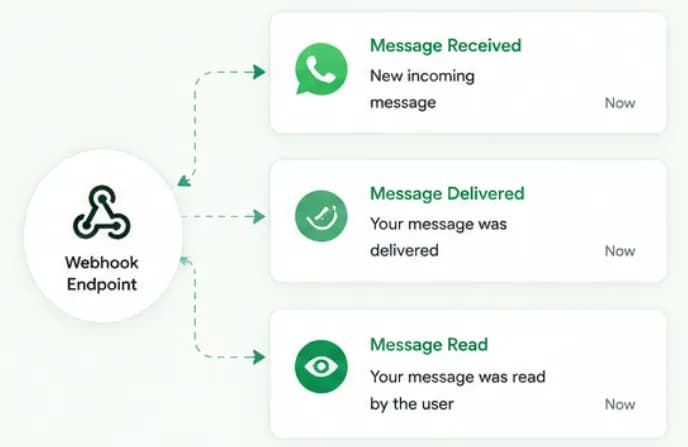
- The most important events are incoming messages and message statuses: sent, delivered, read and failed.
- Meta verifies your endpoint once with a challenge, then signs every notification with an X-Hub-Signature-256 header.
- Respond with HTTP 200 fast and process asynchronously; failed deliveries are retried, so handlers must be idempotent.
- Chatbox AI forwards events such as Message Received, Template Approved and Message Read to your own webhook URL.
Every useful WhatsApp integration, a chatbot, a CRM sync, an order-status tracker, depends on one thing: knowing, instantly, when something happens. On the WhatsApp Business API, that job belongs to webhooks.
What is a WhatsApp webhook?
A webhook is a URL on your server that Meta calls with an HTTPS POST whenever an event happens on your WhatsApp Business Account. Instead of asking "any new messages?" every few seconds, your system simply waits to be told.
The body of each call is a JSON payload describing the event: who sent it, which phone number received it, what type of message it was, and when.
Which events do WhatsApp webhooks send?
| Event | When it fires | What you typically do |
|---|---|---|
| Incoming message | A customer sends text, media, a location, a button tap, a list reply or a Flow submission | Route to chatbot or agent, save to contact history |
| Message status | Your message is sent, delivered, read or failed | Update delivery reports, retry or fall back on failure |
| Template status | A template is approved, rejected, paused or disabled | Notify the marketing team, switch to a backup template |
| Template quality | A template's quality score changes | Review content and targeting before it is paused |
| Account updates | Changes such as phone number quality, messaging limit or account restrictions | Alert admins |
Incoming messages and statuses arrive under the messages field of the webhook. Ads-driven chats include referral details, useful for attributing Click-to-WhatsApp ads.
How do you set up a WhatsApp webhook?
On Meta's Cloud API, setup has two parts.
1. Verification handshake
When you register a callback URL, Meta sends a GET request with three query parameters: hub.mode, hub.verify_token and hub.challenge. Your server checks that the verify token matches the one you configured and responds with the challenge value. That proves you control the endpoint.
2. Subscribing to fields
You then subscribe your app to the WhatsApp Business Account fields you care about, most commonly messages. From then on, events flow to your URL.
If you use a platform, this part is already done. Chatbox AI receives Meta's webhooks and lets you forward events such as "Message Received", "Template Approved" or "Message Read" to your own endpoint via Webhook APIs.
How do you secure a WhatsApp webhook?
- Verify signatures. Meta signs every payload with an HMAC-SHA256 hash of the request body using your app secret, sent in the
X-Hub-Signature-256header. Recompute it on the raw body and reject mismatches. - Use HTTPS with a valid certificate. Self-signed certificates are not accepted.
- Keep secrets out of code. Store the app secret and verify token in environment variables.
- Don't trust the payload blindly. Validate phone numbers and IDs before writing to your database.
What are the best practices for reliable webhooks?
- Acknowledge fast. Return HTTP 200 as soon as the signature checks out, then put the event on a queue. Slow responses trigger retries.
- Be idempotent. Store each message ID or status ID and ignore duplicates.
- Expect out-of-order events. A "read" status can occasionally arrive before "delivered". Keep the furthest state reached.
- Log raw payloads. Keep them for a short period for debugging.
- Handle failures meaningfully. A
failedstatus includes an error code, for example when a number is not on WhatsApp or when a message falls outside the 24-hour window. Surface these in reports rather than hiding them. - Monitor. Alert when error rates rise or when events stop arriving.
What can you build with WhatsApp webhooks?
- CRM sync: create or update a lead in LeadSquared or an in-house CRM the moment a new customer messages. See the LeadSquared integration.
- Order workflows: when a customer taps "Confirm COD", mark the order confirmed in your backend.
- Delivery analytics: build dashboards from sent, delivered and read statuses. Chatbox AI's analytics does this out of the box.
- Flow submissions: save answers from WhatsApp Flows directly into your systems.
- No-code automation: connect events to 1,000+ apps through Integrately.
What does a typical webhook-driven journey look like?
Here is how the events fit together for a single template message:
- Your system sends a utility template, say, a shipping update, through the API and receives a message ID.
- A sent status arrives when Meta accepts the message, followed by delivered when it reaches the customer's phone.
- A read status arrives when the customer opens it, if read receipts are on.
- The customer taps a quick-reply button. An incoming message event arrives with the button's payload, and the 24-hour customer service window opens.
- Your chatbot replies with a free-form message, which generates its own status events.
Each status carries the same message ID you received when sending, which is how your system ties events back to the right campaign, order or contact. Status events also include pricing details, whether the message was billable and which category applied, which helps you reconcile actual spend against estimates from the WhatsApp pricing calculator. Template events matter too: if a template you adapted from the WhatsApp template library is rejected or paused, a webhook tells you before your next campaign fails.
Do you need to write webhook code at all?
Only if you are building something custom. Chatbox AI handles Meta's webhooks for the team inbox, chatbots and reports, and exposes a REST API and webhooks for developers, documented in Developer APIs. If you want to understand the layer underneath, read what the WhatsApp Cloud API is.
Start a 7-day free trial to connect your number and start receiving real-time WhatsApp events in minutes.
Frequently asked questions
With an API, your system makes a request when it wants something, such as sending a message. With a webhook, the other system calls you when something happens, such as a customer reply. WhatsApp integrations need both: the API to send and webhooks to receive.
What is the difference between an API and a webhook? With an API, your system makes a request when it wants something, such as sending a message. With a webhook, the other system calls you when something happens, such as a customer reply. WhatsApp integrations need both: the API to send and webhooks to receive.
Why am I receiving the same webhook twice? Webhook delivery is at-least-once. If your server responds slowly or with an error, Meta retries, and occasional duplicates can happen anyway. Store the message ID and skip events you have already processed.
Do I need my own webhook if I use Chatbox AI? No. Chatbox AI receives Meta's webhooks for you and powers the inbox, chatbots and reports. You only need your own endpoint if you want events pushed into another system, such as an in-house CRM or data warehouse.
Can webhooks tell me if a customer read my broadcast? Yes, when the customer has read receipts turned on. Status webhooks report sent, delivered and read for each message, and failed with an error code when delivery is not possible.
What happens if my webhook endpoint is down? Meta retries failed deliveries for a period of time with decreasing frequency, so short outages usually recover. Longer outages can lose events, so monitor your endpoint and alert on errors.
